SAP RISE / SAP Cloud ERP Private

Build around your business needs.
Keep complexity in control.

Considering a new SAP implementation or transforming an existing landscape? Erendi helps assess SAP Cloud ERP Private when industry scope, process flexibility, and operational requirements call for a more tailored approach. We confirm the appropriate SAP offering as part of that assessment.

Inside SAP Cloud ERP Private / Official SAP visuals

Complex operations.
A clearer basis for decisions.

Explore the target operating model—not just individual apps. See how profitability analysis, production scheduling, and fulfilment visibility can support your business.

Select a business question. Inspect the original screen.

For CFOs & business leaders

Which segments are earning their margin?

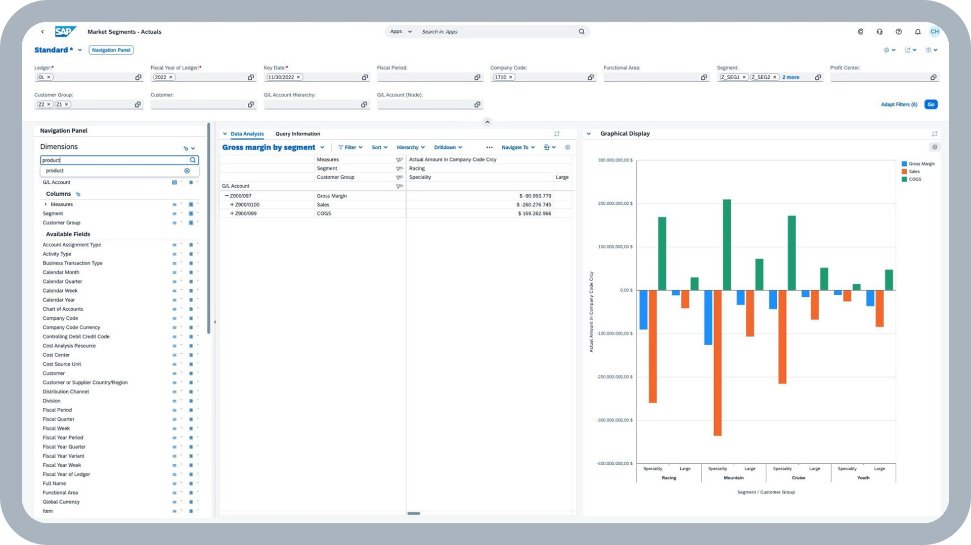
Revenue growth can hide uneven profitability. View sales, cost of goods sold, and gross margin across business segments.

  1. Business dimensions

    View the analysis by segment and customer group.

  2. Margin composition

    Compare sales, cost of goods sold, and gross margin.

  3. Reporting context

    Keep ledger, period, company code, and other filters explicit.

The decision it supports

Which segment needs a closer pricing or cost review?

Market Segments · Actuals
Official SAP market-segment actuals analysis showing gross margin, sales and cost of goods sold by segment and customer group.Enlarge screenshot
SAP · Cloud ERP Private / Finance ↗Sample data

Official SAP product illustration. Sample figures are not Erendi customer results.

Where Erendi comes in

Align profitability dimensions, costing rules, and financial reconciliation when designing reporting for the target ERP.

For operations & planning leaders

Where does the production plan come under pressure?

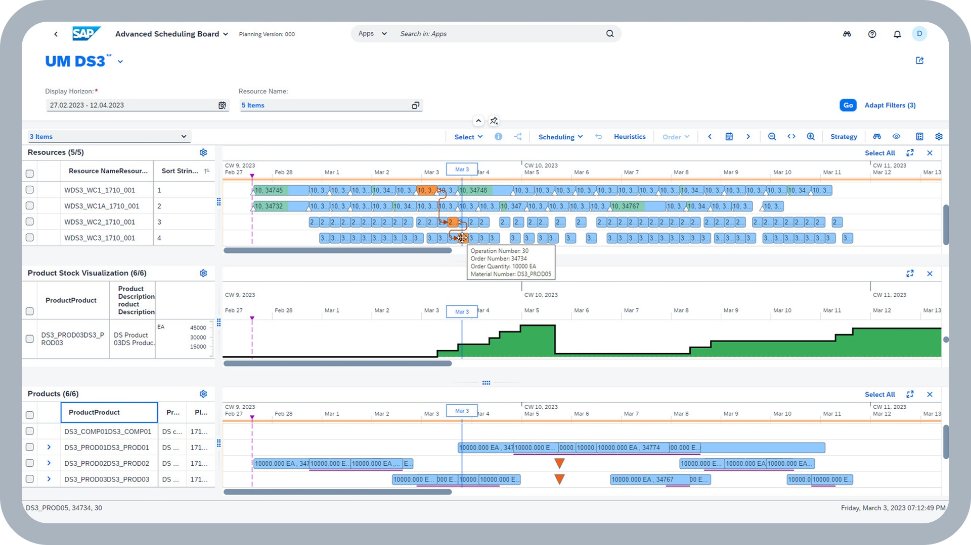
A plan is only useful if its dependencies are visible. Bring resource schedules and the material picture into one planning view.

  1. Resource schedule

    Compare operations across resources on a common timeline.

  2. Material picture

    Read the product-stock curve alongside the schedule.

  3. Dependencies

    Review product requirements and planned operations together.

The decision it supports

Which resource or material dependency needs a planner’s attention?

Advanced Scheduling Board
Official SAP Advanced Scheduling Board with resource timelines, scheduled operations, product stock visualization and product requirements.Enlarge screenshot
SAP · Cloud ERP Private / Manufacturing ↗Sample data

Advanced planning and scheduling illustration. Availability depends on release, configuration, and licensed scope; it is not assumed to be included in every SAP RISE subscription.

Where Erendi comes in

Validate planning master data, capacity assumptions, and integration dependencies; assess advanced scheduling scope separately.

For commercial & operations leaders

Which sales commitments need intervention?

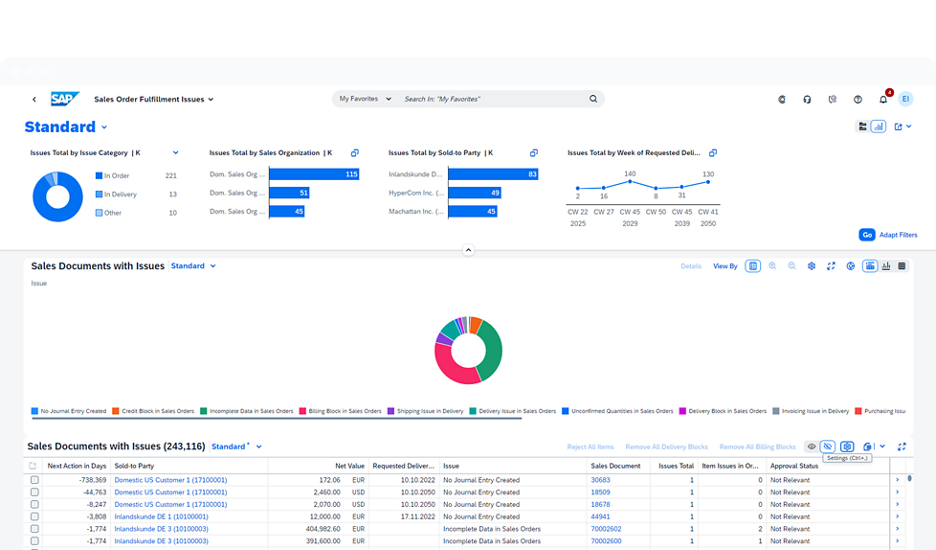
An exception overview gives the team a starting point for action—not another long list to review without priorities.

  1. Issue patterns

    Compare the categories of fulfilment issues.

  2. Organizational view

    See how issues are distributed across sales organizations.

  3. Document worklist

    Move the review toward the affected sales documents.

The decision it supports

Which issue should the sales and operations teams investigate next?

Sales Order Fulfillment Issues
Official SAP sales-order fulfilment overview with issue charts and a document-level worklist.Enlarge screenshot
SAP · Cloud ERP Private ↗Sample data

Official SAP product illustration, not a live Erendi implementation or evidence that every exception is resolved automatically.

Where Erendi comes in

Map fulfilment dependencies and integrations, assign exception owners, and test the business-critical order scenarios before cutover.

Product imagery published by SAP for SAP Cloud ERP Private, not an Erendi customer implementation or a separate RISE application. © SAP SE or an SAP affiliate company. Screens and capabilities vary by release, role, configuration, and licensed scope.

SAP product screenshot

Original screenshot · Sample data. Scroll to inspect details. Press Escape to close.

The value is in the connections

One business event.
More than one department.

Whether you start fresh or transition an existing ERP, assess process handoffs, data, and controls alongside the target user experience.

  1. 01

    Order

    Agree price, terms, and the customer commitment.

  2. 02

    Fulfil

    Check supply and execute delivery.

  3. 03

    Post goods issue

    Record the inventory movement and its accounting impact.

  4. 04

    Bill

    Create the invoice and the related accounting entry.

  5. 05

    Collect & reconcile

    Match the receipt and clear the receivable.

Illustrative process map—not a recording of the screenshots above. Exact steps and accounting depend on the agreed business scenario.

GROW or RISE?

Choose for the business.
Not just its ERP history.

Being new to SAP does not automatically rule out Private Cloud. Start with process fit, industry requirements, integration needs, and how much change your organization is ready to own.

Standard-led / Public Cloud

Consider SAP GROW when…

  • Your critical processes fit the Public Cloud scope and standard best practices.
  • You prefer to standardize how the business works rather than reproduce every legacy variation.
  • You can adopt SAP’s regular update cycle and supported extension options.

Example: A distributor wants common finance, purchasing, inventory, and sales processes across its entities.

Explore SAP GROW
Tailored requirements / Private Cloud

Consider SAP RISE / Private Cloud when…

  • Critical industry or process requirements need scope or flexibility beyond the assessed Public Cloud fit.
  • You need more control over configuration, extensions, and upgrade planning, within SAP’s supported policies.
  • You are planning a new SAP implementation or transitioning an existing SAP landscape.

Example: A company new to SAP has specialized production requirements that justify a Private Cloud assessment.

Explore SAP RISE

Neither is automatically the better or cheaper answer.

Public Cloud can support demanding businesses; Private Cloud is not a licence for unlimited customization. Compare the required scope, clean-core design, integrations, implementation effort, ongoing responsibilities, and total cost.

New to SAP? Here is the important distinction.

SAP Cloud ERP Private supports new implementations as well as transitions from existing SAP systems. SAP’s current RISE journey messaging emphasizes existing SAP customers. For a net-new customer, Erendi will assess Private Cloud fit and confirm the applicable commercial offering and eligibility with SAP before recommending a package.
References: SAP: Private Edition for net-new implementations ↗ · SAP: current RISE journey ↗

Erendi transformation approach

Control the transition.
Not just the technology.

Define the evidence needed at each stage. A successful technical migration is only one part of a business-ready transformation.

01

Assess

Map business-critical processes, current systems (SAP or non-SAP), data, integrations, and industry requirements.

02

Decide

Assess a new implementation or an applicable SAP transition path; agree clean-core design, scope, and investment assumptions.

03

Validate

Rehearse data migration, reconcile financial results, test integrations, and prove critical business scenarios.

04

Transition

Plan cutover and rollback criteria, business ownership, hypercare, and the support handover.

A better way to evaluate ERP

Bring a real business question.
Ask us to walk it through.

Discuss a scenario-led session with Erendi. Start with the process that matters to your investment decision—not a tour of every menu.

Plan a scenario-led demo
What to evaluate together
  1. Business fitYour process, roles, exceptions, and success measures.
  2. Evidence in the systemWhat the screen demonstrates, what needs configuration, and what remains to be validated.
  3. Delivery & investmentScope, licensing dependencies, integrations, migration, and adoption responsibilities.

A demo is not a fixed quote or a guarantee of savings. Build the business case from your baseline.